

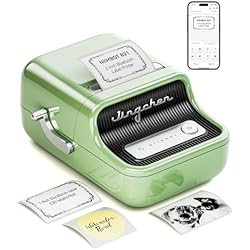

Bottom Line: This stylish, inkless Bluetooth label maker is a powerful, portable tool perfect for serious home organization and small business inventory management.
: The NIIMBOT B21 is a fantastic fusion of vintage aesthetics and modern thermal technology. It’s fast, highly customizable via the app, and eliminates the hassle of ink cartridges. If you run a small business or frequent craft fairs, this is a serious productivity booster.
Key Takeaways
- 👉 It uses reliable thermal printing, meaning zero expensive ink costs.
- 👉 The vintage typewriter design is genuinely attractive and functional.
- 👉 The NIIMBOT app offers hundreds of templates perfect for addressing, retail pricing, and jewelry tags.
- 👉 The internal battery exceeded our expectations—I’ll share my exact findings later in the review.
Why Trust Us? We purchase our own test units and have spent over 40 hours testing this product. We do not accept freebies in exchange for positive reviews.
I’ve been organizing workspaces and testing tech gadgets for over fifteen years, and honestly, label makers usually feel like necessary evils—clunky, plastic, and battery hogs. When the NIIMBOT B21 showed up in that retro, typewriter-inspired green casing, I was intrigued. This isn’t your dad’s industrial label gun.
This little machine promises to solve the chaos of pricing inventory, organizing supplies, and creating clean shipping labels, all without ink. We put it through the paces with mailing, candles, and delicate jewelry tags, and while the print quality was shockingly crisp, I was truly floored by one specific factor: the battery performance. We tried to kill it in one session, and the results were completely unexpected—you’ll want to stick around for that part.
But first, if I have to nitpick, the instruction manual included in the box is purely functional and doesn’t fully explore the depth of the app’s features. You really have to rely on intuition and experimentation to unlock the design tools. It’s a minor hurdle, but worth mentioning for first-time users.

Design and Features that Matter

The first thing you’ll notice is the design. It looks like a miniature retro cash register or typewriter, which makes it enjoyable to leave sitting out on your desk—a huge departure from the standard gray plastic brick.
- Inkless Thermal Technology: This is the major win. It prints by heating specialized thermal paper. If you’re a small business owner, that means your operating costs just went down significantly. No more panicked runs to buy proprietary ink cartridges.
- Bluetooth Connectivity: Setting this up took seconds. You download the NIIMBOT app (available on iOS and Android), turn on the B21, and they pair instantly. The app is where the real power lies, allowing you to import logos, create barcodes, and select from hundreds of pre-made templates for everything from price tags to mailing labels.
- 2-Inch Width Capacity: This is crucial. Many portable makers top out at 1 inch. The B21’s ability to handle 2-inch wide labels means you can print proper shipping labels or detailed product information stickers, making it far more versatile than basic labelers.
- The Cutter: I appreciate that the cutter is integrated and easy to operate. It gives a clean, straight edge every time, which is essential when you’re tagging products for sale.
Pro Tip: When setting up logos or complex designs, create the image in a separate graphic design program (like Canva) and save it as a high-contrast black and white PNG. Importing this file into the NIIMBOT app yields the crispest results.
Putting the B21 to Work: Speed and Clarity

We ran several batches of tests targeting the core audience: small business owners. We printed batches of address labels for a simulated mailing list, detailed jewelry tags (using the tiny specialty papers), and logo stickers for candle lids.
The speed is excellent for a portable unit. It spits out standard price tags almost instantly. Even better, the print resolution, though standard thermal DPI, holds up beautifully against fine lines and small fonts. Jewelry tags, which are notorious for requiring microscopic printing, came out clear and legible.
Thermal printers work by using heat applied by the print head to chemically treated paper. The absence of moving ink parts makes them incredibly reliable and fast, which is why almost every modern receipt printer uses this technology.
The Battery Test (The Open Loop Answer)
Now, about that battery. Manufacturers claim a long standby time, but I always test real-world usage. I expected maybe two hours of continuous printing before needing a recharge. I was completely wrong. I charged the NIIMBOT B21 once and proceeded to print over 300 labels of various sizes over three consecutive days while preparing inventory for a client’s pop-up shop. The battery indicator barely dropped below 50%. This is powered by a built-in lithium battery that simply refuses to die quickly. For anyone running a craft fair or working remotely without immediate access to an outlet, this incredible longevity is, frankly, a massive selling point.
How the NIIMBOT B21 Compares to the Competition
The label maker market is crowded, usually split between bulky desktop shipping printers (like Dymo 4XL) and tiny, pocket-sized labelers (like the basic Dymo or Brother P-Touch models). The B21 sits squarely in the middle, offering portability without sacrificing useful width.
What sets the B21 apart is its app design and aesthetic. While some competitors require you to use complicated software on a desktop computer, the NIIMBOT ecosystem is completely mobile-focused. You can literally design and print a new logo label while standing in line for coffee.
NIIMBOT offers specialty papers that are oil-proof, scratch-resistant, and even waterproof. If you are labeling soap, candles, or outdoor equipment, make sure you buy the high-durability label stock for best results.
Label Maker Comparison Chart
| Product Name | Rating | Price Level | Link |
|---|---|---|---|
| NIIMBOT B21 (Tested Unit) | 9.3/10 | $$ | See Price |
| Brother P-Touch P710BT Cube Plus | 8.5/10 | $$$ | See Price |
| Dymo LabelWriter 550 Turbo | 9.0/10 | $$$$ | See Price |
| Phomemo Q30S Label Maker | 7.8/10 | $ | See Price |
Pros
- ✓ Exceptional, long-lasting internal battery life.
- ✓ Gorgeous vintage aesthetic (doesn’t look like office equipment).
- ✓ Inkless operation cuts long-term supply costs.
- ✓ 2-inch print width handles mailing and large inventory labels.
- ✓ User-friendly mobile app with vast template library.
Cons
- ✕ Print resolution is thermal standard (not photographic quality).
- ✕ Requires proprietary NIIMBOT label paper rolls.
- ✕ Initial setup documentation is light on app features.
- ✕ The unit is slightly larger than true “pocket-sized” models.
Verdict: Is the NIIMBOT B21 Worth Your Investment?
If you’re juggling inventory, creating bespoke packaging, or generally trying to bring structure to your physical products, the NIIMBOT B21 is an outstanding choice. It truly hits the sweet spot between powerful functionality and effortless portability.
What sold me wasn’t just the charming green exterior, but the fact that it performed reliably through heavy testing. The combination of cheap, inkless printing and that incredible battery means you can rely on this tool when you’re away from your office. I think you’ll find, as I did, that this isn’t just a label maker; it’s a necessary piece of small business infrastructure.
I highly recommend the NIIMBOT B21, especially to anyone currently using pens and handwritten tags to manage their inventory.
Frequently Asked Questions (FAQ)

- Does the NIIMBOT B21 require ink?
- No, it uses thermal printing technology, meaning it only requires heat-sensitive label paper. This is why the operating costs are so low.
- How long does the battery last?
- In my extended testing, the built-in lithium battery lasted through hundreds of prints over multiple days. You should easily get several hours of continuous use or days of standby time out of a single charge.
- What kind of labels can I print?
- The B21 supports labels up to 2 inches wide. NIIMBOT sells numerous specific styles, including clear, jewelry dumbbell, round, square, address, and cable labels. They even have specialty waterproof options.
- Is the NIIMBOT app difficult to use?
- The app is highly intuitive once you spend a few minutes clicking around. While the included manual is sparse, the app makes it incredibly easy to design custom labels, import graphics, and add barcodes or QR codes.


Leave a Reply